• Recent
  • Categories
  • 0 Unread 0
  • Popular
  • Tags
  • More
    • Guidelines
    • Disclaimer
  • Users
Skins
  • Light
  • Default
  • Cerulean
  • Cosmo
  • Flatly
  • Journal
  • Litera
  • Lumen
  • Lux
  • Materia
  • Minty
  • Morph
  • Pulse
  • Quartz
  • Sandstone
  • Simplex
  • Sketchy
  • Spacelab
  • United
  • Yeti
  • Zephyr
  • Dark
  • Cyborg
  • Darkly
  • Slate
  • Solar
  • Superhero
  • Vapor
Collapse
Definedge Forum Logo

P&F Charts - Vertical count

Scheduled Pinned Locked Moved Charts
1 Posts 1 Posters 11 Views
    • Oldest to Newest
    • Newest to Oldest
    • Most Votes
Reply
  • Reply as topic
Log in to reply
This topic has been deleted. Only users with topic management privileges can see it.
  • V Offline
    V Offline
    Viswanath B

    Pro User

    wrote on last edited by
    #1

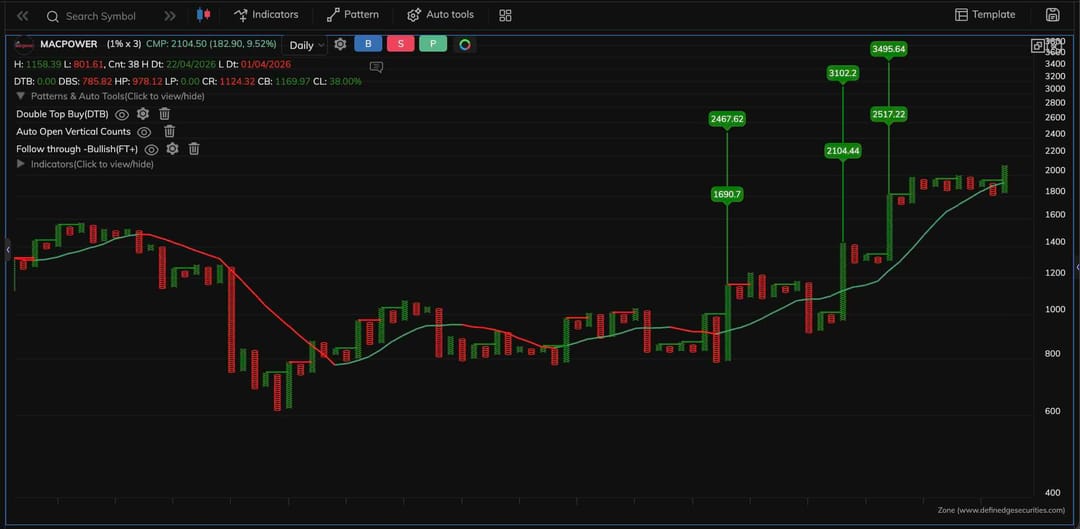
    @Definedge @@Definedge-Experts There is an option in Zoneweb to update the chart with Auto Open Vertical counts. I tried it on MACPOWER (as an example). Attached here for reference. I can see the numbers on 3 columns. I understand the calculation on box size and box count. My question is how to choose the significant column. Is the calculation valid on all columns or "significant" columns only. Please clarify. Is it a Double Top following an anchor column? This is what I thought, but in this picture I find that the vertical counts is actually added to the anchor columns only. Please can someone clarify. MACPOWER_1.jpg
    1 Reply Last reply
    0


Recent Posts

  • V
    P&F Charts - Vertical count
  • R
    Backtesting of momentum investing scanner
  • R
    Option simulator and backtest of option LEAPS
  • N
    Market Breadth - technical alerts/ condition
  • N
    Denominator choice in RS?
  • Login

  • Login or register to search.
  • Blog
  • Youtube Videos
  • Refresh
  • First post
    Last post
0
  • Recent
  • Categories
  • Unread 0
  • Popular
  • Tags
  • More
    • Guidelines
    • Disclaimer
  • Users
  • Login

  • Login or register to search.
  • Blog
  • Youtube Videos
  • Refresh